

IPTV Reseller Credit Log Reconciliation Guide 2026

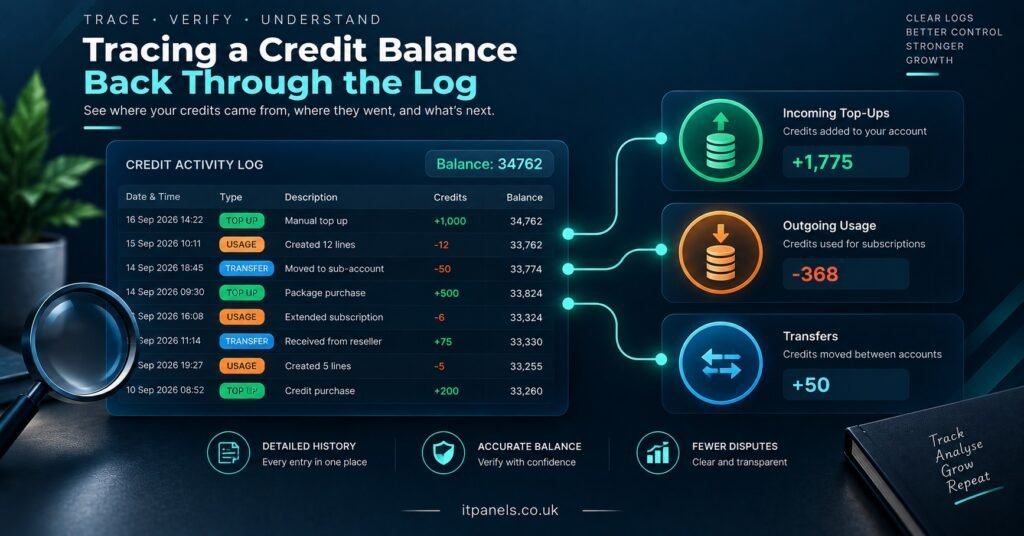
An IPTV Reseller Credit Log is the running record of every credit added to, spent from, or passed out of your panel balance, and it is the only reliable answer to the question most resellers ask too late: where did the credits actually go? Each entry carries a timestamp, a quantity, and usually the account or action that triggered it, which means a balance you cannot explain is almost never a panel fault. It is an entry you have not read yet.
Most IPTV panel resellers only open the log when the number at the top of the dashboard looks wrong, and by then the cause is often weeks old. A trial that was issued at full duration, an upgrade that charged a second credit against the same customer, a block handed to a sub-reseller on a voice note and never written down anywhere else. None of those look dramatic on the day. They only become confusing once the balance has moved past them. Checking the log on a fixed day, rather than during a panic, keeps the gap small enough to trace in minutes.
Credits move in four directions, and only one of them is obvious
Selling a subscription is the deduction everyone expects. The other three catch people out. Credits arrive through top-ups, leave through account creation and renewal, move sideways through sub-reseller transfers, and occasionally shift through manual adjustments made by the provider or by you. A balance only makes sense when all four are read together.
The practical consequence is that you cannot audit a credit balance by counting customers. Twenty active lines does not mean twenty credits spent. Some of those lines were created on longer durations, some were extended mid-cycle, some started as trials that were later converted, and some may have been created twice because the first attempt appeared to fail. The log separates all of that. Your customer list cannot.
| Entry type | What to confirm before moving on |
|---|---|
| Credit addition | Quantity matches the top-up you paid for, at the rate you paid |
| Creation deduction | One line, one deduction, at the duration you actually intended |
| Renewal deduction | Applied to an existing username, not a duplicate account |
| Transfer out | Block size and receiving sub-reseller both match what was agreed |
| Manual adjustment | A reason was recorded at the time, by whoever made it |
Where the numbers usually stop matching
Three patterns account for most unexplained gaps, and all of them are visible in the log if you know what you are looking at.
Duplicate creations after a failed attempt
If a line appears not to generate, the instinct is to create it again. On many panels the first attempt did complete and did deduct, it simply did not display straight away. You end up with two lines and two deductions for one paying customer. In the log this shows as two creation entries seconds or minutes apart, often with near-identical usernames. Catching it the same day means the spare line can usually be dealt with. Catching it three months later means you have been carrying the cost since.
Duration changes treated as new charges
Extending a customer from one month to three, or moving them onto a longer package mid-cycle, is not always a free edit. Depending on how the panel handles it, the change can deduct for the new duration rather than the difference. The log will show a deduction where you expected an edit. This is worth testing deliberately on one account before you offer upgrades across your customer base.
Trials that were never actually free
Some panels issue trials from a separate allowance. Others take them straight from the credit balance at whatever duration was selected. If a week of free access quietly costs a full month of credit, and you offer trials generously, the arithmetic turns against you fast. Check one trial entry in the log rather than assuming. The answer differs between panels and sometimes between packages on the same panel.
Running a monthly reconciliation on your IPTV Reseller Credit Log
Reconciliation sounds heavier than it is. You are checking one equation: opening balance, plus additions, minus deductions, minus transfers out, plus anything returned to you, should equal the balance showing now. If it does not, the difference tells you roughly how many entries you are looking for.
Work backwards from today rather than forwards from the start of the month. Recent entries are the ones you can still verify from memory and messages, and most discrepancies are recent. Note every deduction that does not have a customer payment sitting behind it. Those are your real problem entries, and they usually fall into one of three buckets: work you did for free and forgot, a duplicate, or a transfer you have not recorded on your side.
Keep the customer side of this separate from the panel. A running sheet of username, start date, duration, and amount paid gives you something to check the log against, and it survives even if panel history is trimmed. If you already run a structured IPTV Panel reseller CRM workflow, the credit log becomes a verification layer on top of it rather than a separate chore.
Pro tip: Reconcile on the same date each month and record your closing balance in your own notes. A figure you wrote down yourself is far easier to argue from than a figure you are trying to remember.
Sub-reseller transfers cause the most disputes
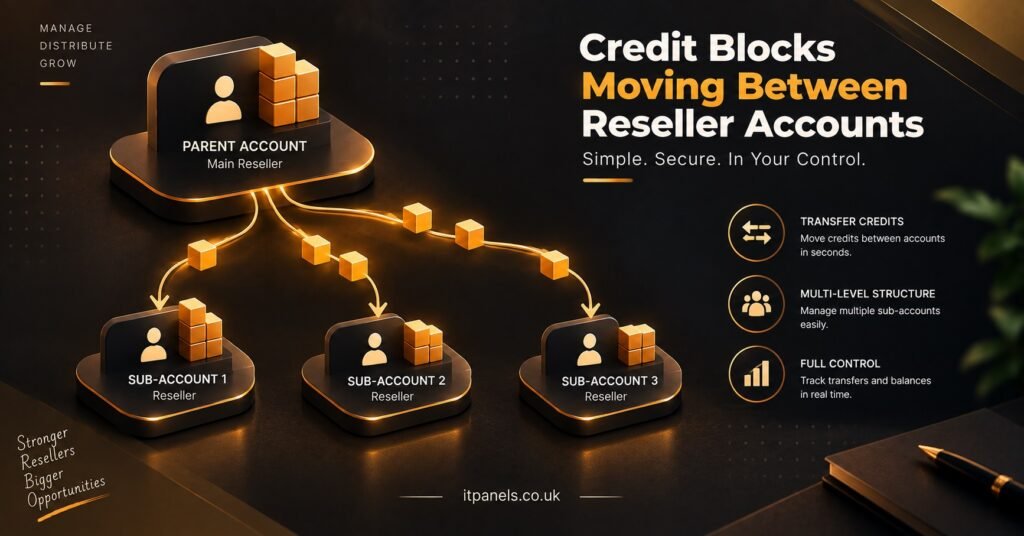
Transfers are the only entries that leave your balance without creating a customer, which makes them the easiest to lose track of and the hardest to resolve after the fact. A sub-reseller who believes they received 40 credits and a parent reseller who believes they sent 50 have a disagreement that only the log can settle, and only if both sides are reading the same entry.
What a clean transfer entry should let you confirm: the date and time, the quantity, the receiving account name, and which side initiated it. If your panel records less than that, write the missing detail down yourself at the moment of transfer. A two-line message confirming the block size, sent to the sub-reseller and kept, costs nothing and closes the argument before it starts.
Returns need the same discipline. If credits come back to you, whether a sub-reseller winds down or a block was sent in error, that return is an entry in its own right. Resellers who mentally treat a return as cancelling out the original transfer end up with two unexplained movements instead of a matched pair.
Pro tip: Before enabling a new sub-reseller, send one small test block and check how it appears in both logs. Learning the entry format on 5 credits is cheaper than learning it on 100.
What the log tells you about your real cost per credit
If you have topped up more than once, you have probably bought at more than one rate. Larger blocks usually carry a lower unit price, which means your true cost per credit is a blend of every top-up in the log rather than the price on your most recent invoice. Pricing customer subscriptions against your cheapest tier when most of your balance was bought at a higher one quietly compresses your margin.
The addition entries give you the raw material for that calculation: quantity and date for each top-up, matched against what you actually paid. Worth doing before you set renewal pricing, and worth repeating whenever you move up a tier. If you are still working out purchase sizing, the practical trade-offs are covered in more depth in this guide to how many IPTV reseller credits you need to start, and current block pricing sits on the IPTV reseller panel plans page.
When the credit log and the account history disagree
Occasionally a deduction appears with no corresponding account, or an account exists with no deduction behind it. Before raising it with your provider, cross-check against the reseller activity log, which records creations, edits and logins rather than credit movements. Between the two records you can usually establish whether a line was created and then deleted, created under a different username than you remember, or never created at all.
Bring three things when you escalate: the exact timestamp, the quantity in dispute, and what you expected to see instead. Providers can generally resolve a specific entry quickly. A message saying the balance looks wrong, with no reference point, tends to go round in circles.
Month End Reconciliation Checklist
- Record the opening and closing balance in your own notes, outside the panel
- List every top-up for the period and confirm quantity against payment
- Flag any deduction with no customer payment behind it
- Check for creation entries clustered within minutes of each other
- Confirm every transfer out has a matching agreed block size with the sub-reseller
- Log returned credits as their own entry rather than mentally cancelling a transfer
- Recalculate your blended cost per credit if you topped up at a new rate
- Note anything unexplained with its timestamp before the detail fades
Questions resellers ask about credit logs
Does the credit log show which customer each deduction belongs to?
Usually yes for creations and renewals, since the deduction is tied to the line that triggered it. Transfers and manual adjustments often carry less detail, which is why those are the entries worth annotating yourself.
Why did issuing a trial deduct a full credit?
Because on some panels trials draw from the same balance as paid lines, at whatever duration was selected. Check a single trial entry in the log to see how yours behaves before offering trials at scale.
Can credits transferred to a sub-reseller be pulled back?
That depends entirely on the panel and on your arrangement with the provider. Some setups allow a reversal, others treat the transfer as final once the receiving account has spent against it. Establish the answer before you need it.
How long should I keep my own copy of the log?
Longer than the panel keeps it. Retention windows vary between systems, and older entries can roll off. A simple monthly export or screenshot of your closing balance is enough for most reseller operations.
Is a falling balance with no new customers always a problem?
Not necessarily. Renewals deduct in the same way new creations do, so a stable customer base still consumes credits every cycle. What matters is whether each deduction has a paying line behind it.
Where to start if you have never reconciled a balance
You do not need to rebuild history. Take today’s figure as your opening balance, write it down somewhere outside the panel, and reconcile forward from here. Within two cycles you will know which entry types your IPTV Reseller Credit Log records clearly and which ones need a note from you at the time. The log is honest about what happened, but it will not flag a duplicate creation, warn you that a trial was expensive, or remind you what a sub-reseller transfer was supposed to be. That part stays with you, and it takes about ten minutes a month once the habit is in place. Pick your reconciliation date, note your current balance, and start the next cycle with a number you can actually defend.

[…] IPTV Reseller Panel Security is mostly authentication hygiene, done properly and then left alone. The specifics have […]