


IPTV Reseller Credit Top-Up Timing: Reorder Points 2026

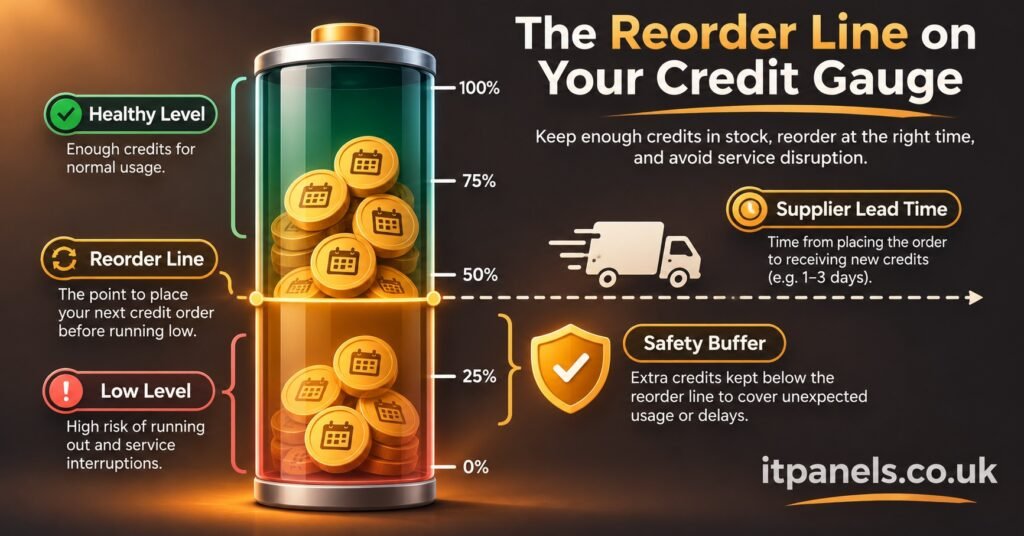
IPTV Reseller Credit Top-Up Timing comes down to one trigger: buy more credits when your balance falls to the number you’ll use up while you wait for new ones to arrive, plus a cushion for days that run busier than usual. That trigger is your reorder point. To work it out, multiply your expected daily usage by the supplier’s lead time in days, then add a safety buffer. Top up as soon as your panel balance reaches that figure, not when it hits zero.
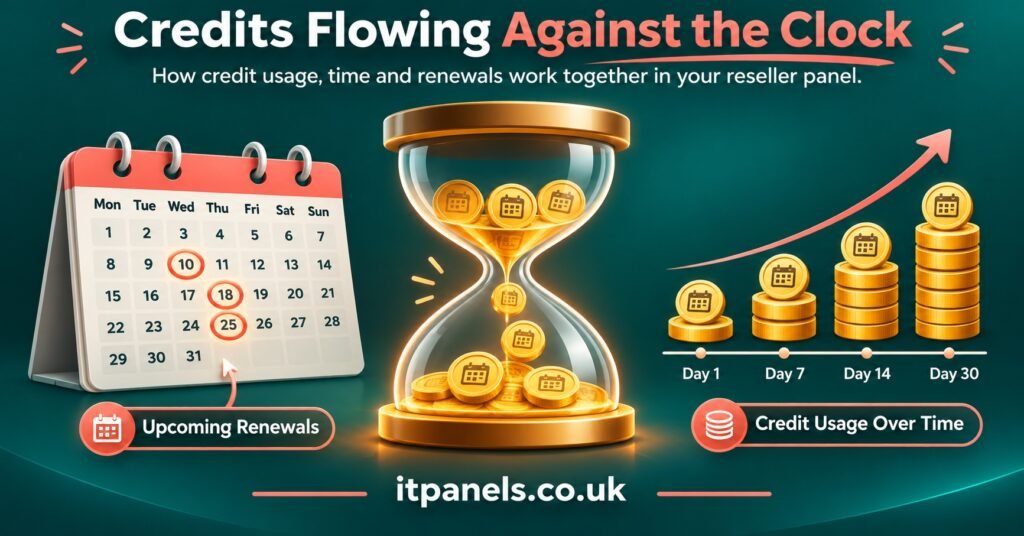
Most IPTV resellers who run dry haven’t got their average wrong. They’ve underestimated the wait. A card payment that clears in minutes on a Tuesday can sit unapproved over a weekend, and a bank transfer to a provider who confirms top-ups by hand can take even longer. Your panel already holds most of what you need to set the number properly. Every active line has an expiry date, so a good part of the next fortnight’s demand is visible before it happens.
The Three Numbers Behind Every Top-Up Decision
The reorder point is borrowed from ordinary stock control, and it fits credit-based reselling surprisingly well. You’re holding inventory, it just happens to be digital. Three inputs decide it.
Expected daily usage is the number of credits your account consumes on an average day. That covers new activations, renewals and any multi-month packages. On most credit systems a longer package uses several credits at once.
Supplier lead time is the gap between deciding to top up and seeing the credits in your balance, ready to spend. It isn’t the time a payment takes to leave your account. It runs until the credits are usable.
The safety buffer is the extra stock you hold to absorb two kinds of surprise: a day with more renewals than usual, and a top-up that takes longer than normal.
Put together:
Reorder point = (expected daily usage × lead time in days) + safety buffer
Everything else in this article is about getting those three inputs from your own records rather than guessing them.
Reading Expected Daily Usage From Your Own Panel
Count credits, not customers
A reseller with 120 active customers doesn’t necessarily use four credits a day. If a third of those customers are on twelve-month packages, their renewals land as large blocks of credits on a few dates in the year. Customers on monthly lines draw small amounts all the time. Daily usage has to be measured in the unit your provider deducts. Pull your credit transaction log for the last 30 to 60 days, total the credits spent, and divide by the number of days.
Look ahead at the expiry calendar
This is where credit reselling has an advantage over most stock businesses. A shop has to guess how many people will walk in tomorrow. You can sort your reseller dashboard by expiry date and see exactly which lines are due in the next 7, 14 or 30 days. Not every one of those customers will renew, but renewals are usually the bulk of steady demand. A forward-looking figure is therefore often more reliable than a backward-looking average.
A sensible approach is to work out both numbers and plan on the higher one. If your 30-day history says three credits a day but the expiry list for the next fortnight implies four, the history is describing a quieter period than the one you’re entering.
Strip out the noise
Trial lines, one-off replacements, and credits moved down to a sub-reseller all distort the average if you leave them in without thinking. Credits passed to sub-resellers deserve particular care. They leave your balance in lumps, on that reseller’s schedule rather than yours. If you supply sub-resellers, track their draw as a separate line and add it to your own usage instead of letting it hide inside one blended figure.
What Lead Time Really Means When Credits Are Digital
It’s tempting to treat lead time as zero because credits aren’t physical. In practice, several delays can sit between “I need more credits” and “the credits are in my panel”, and they add up.
The payment method is the first one. Instant card or wallet payments usually move quickly. Bank transfers may wait for clearing, and some providers won’t release credits until the funds have actually arrived. Then there’s approval. Some panels credit automatically after payment, while others rely on someone at the provider confirming the order by hand. That ties your lead time to their working hours, their time zone and how busy their support queue is.
Weekends and bank holidays stretch both of those. So do first-time top-ups through a new payment route, which can trigger extra verification. Delays also follow account problems. A reseller whose account has been flagged for a billing or access issue may find top-ups paused completely until it’s resolved, which is a good reason to understand the common causes of reseller panel account suspension and how appeals work before they ever affect your timing.
The practical answer is to log it. Every time you top up, write down when you started and when the credits became usable. After a handful of top-ups you’ll have two numbers that matter: your normal lead time and the longest one you’ve actually had. Use the longest one for the buffer, not a hopeful figure.
Pro tip: Note the day of the week next to each top-up in your log. If the slow ones keep landing on Fridays, the fix might be to top up on Thursdays rather than to hold a bigger buffer.
Sizing the Buffer Without Freezing Your Cash
A safety buffer covers the gap between an ordinary period and a bad one. A common way to size it is:
Safety buffer = (busy-period daily usage × longest lead time) − (expected daily usage × normal lead time)
In plain terms, you work out how many credits you’d need in a bad case (a busy spell and a slow top-up at the same time) and subtract what the normal case already covers. The difference is the buffer.
For “busy-period daily usage”, use the average of your busiest week rather than your single busiest day. Planning around the one exceptional day pushes the buffer up sharply, and that extra stock mostly just sits there.
The pull in the other direction is real too. Credits sitting unused are money you’ve already spent, and with most credit packs that money can’t easily come back to you. It’s worth reading a provider’s refund terms before deciding how far ahead to buy. The break-even calculation for credit bundles shows how wasted or idle credits eat into what a pack actually earns. Holding too large a buffer also deepens your dependence on a single provider. If something goes wrong on their side, a large prepaid balance is the part of your business most exposed to it.
So the buffer is a judgement call, not a fixed rule. A reseller with a stable provider and fast automatic top-ups can afford a thin cushion. One who pays by bank transfer to a provider that approves orders by hand needs a thicker one.
Working Out Your IPTV Reseller Credit Top-Up Timing Step by Step
Here’s a hypothetical example. The figures are illustrative, not drawn from any real account, but the method is the same one you’d apply to your own data.
| Input | Figure | Where it came from |
|---|---|---|
| Expected daily usage | 3.3 credits | Expiry list shows 46 credits due in the next 14 days |
| Historic daily usage | 2.8 credits | 84 credits spent over the last 30 days |
| Busy-period daily usage | 5 credits | Average of the busiest week in the log |
| Normal lead time | 1 day | Typical card top-up with manual approval |
| Longest lead time | 3 days | A weekend top-up that waited for approval |
The forward-looking figure (3.3) is higher than the historic one (2.8), so 3.3 is the one to plan with.
Safety buffer = (5 × 3) − (3.3 × 1) = 15 − 3.3 = 11.7, rounded up to 12 credits.
Reorder point = (3.3 × 1) + 12 = 15.3, rounded up to 16 credits.
So whenever the panel balance drops to 16, this reseller tops up that same day. They don’t wait for the evening or the next morning.
How much to buy is a separate question from when. One practical approach is to buy enough to cover usage until your next planned review plus the buffer. At 3.3 credits a day, a monthly review means roughly 100 credits of usage before the next look. The credit packs on itpanels.co.uk’s IPTV reseller plans page come in fixed sizes, so in practice you’d pick the pack closest to your requirement, not an exact number. Larger packs often work out cheaper per credit, but that saving only counts if the credits are used rather than left sitting idle.
When the Formula Should Bend
A reorder point is only as good as the period it was calculated for, and a few situations call for adjusting it ahead of time rather than waiting for the numbers to catch up.
Renewal clusters. If a large batch of customers signed up during one promotion, they’ll all expire in the same week months later. The expiry calendar will show this, but only if you look far enough ahead. Raise the reorder point temporarily for that week, then let it settle back.
Planned promotions. Any offer you’re about to run will push usage above what your history suggests. Top up before it launches, not when the first wave of orders arrives.
Provider uncertainty. If top-ups have recently become slower or less predictable, increase your recorded longest lead time straight away. Don’t average it in gradually. The buffer exists for exactly this.
Payment method changes. Moving from card to bank transfer, or adding a new payment route, resets what you know about lead time. Treat the first few top-ups on the new method as unknowns and keep a wider buffer until you have data.
Recalculate the whole thing once a month, or after any change in volume or provider behaviour. It takes a few minutes with a transaction log and an expiry list, and it stops last quarter’s numbers from quietly setting this quarter’s timing.
A short weekly routine that keeps the number honest:
- Check the current credit balance against your reorder point
- Sort active lines by expiry and count credits due in the next 14 days
- Note any sub-reseller requests that are coming up
- Log the start and finish time of any top-up made that week
- Flag any upcoming promotion or renewal cluster that needs a temporary adjustment
Frequently Asked Questions
Should I top up at a fixed time each month instead of using a reorder point?
A fixed date works if your usage is very steady, but it ignores how quickly the balance is actually falling. A reorder point reacts to real consumption, so a busy fortnight triggers an earlier top-up automatically. Some resellers combine the two, with a monthly top-up and the reorder point as a safety net between them.
What happens to customers if my balance hits zero?
You won’t be able to process renewals or new activations until the top-up arrives. For a customer whose line expires during that gap, the service lapses, and lapsed renewals are one of the more avoidable reasons customers leave.
Is it safer to just buy the biggest credit pack available?
Not necessarily. A large balance lowers the risk of running out, but it ties up cash, increases your exposure if the provider has problems, and may not be refundable. Buy enough to cover your review period plus the buffer, and treat larger packs as a pricing decision rather than a timing one.
How many top-ups do I need to log before my lead time figures are reliable?
There’s no fixed number, but a handful across different days of the week gives you a far better picture than one or two. Make sure at least one falls on a weekend or outside the provider’s normal hours, since that’s usually where the longest delays appear.
Do sub-reseller credit transfers change my reorder point?
Yes. Credits you pass to sub-resellers leave your balance just like your own sales do, often in larger single amounts. Add their typical draw to your expected daily usage, and if one sub-reseller tends to request big blocks, think about raising your buffer by roughly that amount.
Getting the Rhythm Right
Good IPTV Reseller Credit Top-Up Timing isn’t about predicting every renewal. It’s about knowing, in advance, the balance at which waiting becomes a risk. Use your expiry calendar for expected daily usage, your own top-up log for lead time, and a buffer sized for a bad week rather than a disastrous one. That gives you a single number to watch instead of a vague sense that credits are “getting low”.
The one limitation worth respecting is that the formula only reflects the data you put into it. A new provider, a new payment method or a big promotion makes the old figures less reliable. Start by keeping the top-up log for the next month, then recalculate your reorder point with real lead times in place of estimates.

[…] UK IPTV reseller takes about £3,000 a month in subscription sales, with roughly 150 active customers. Over the last […]